




WOLFBOX Brands
WOLFBOX Brands
Tesla already has advanced technology that changes the way you drive. But if you own a Tesla, you may have thought about whether you need a dash cam for extra safety and ease of use. Teslas do have their own built-in dash cam system, but adding a third-party dash cam can make your car more useful in ways you did not think possible.
This guide will talk about Tesla's built-in dash cam, what are its limitations, and why getting a Wolfbox dash cam could be very helpful. This post has everything you need to know to pick the best dash cam for your Tesla.
Table of contents
Yes, Tesla cars have a built-in dash cam system that records video using the Autopilot cameras in the car. This method works well and is useful because it lets you record events on the road while you are driving. Is Tesla's built-in system enough for you, though? If you park in places with low security or drive a lot, a third-party dash cam may give you a lot more peace of mind.
There are some things that the built-in dash cam in your Tesla can not do. Because of this, a lot of Tesla users choose to buy a better dash cam system.
Enhanced Video Quality: With 4K resolution, your dash cam gives you clear and sharp video recording which makes it easier for you to capture important details whenever you need them. "4K" refers to exported video files with a resolution of not less than 3840 × 2160.
Comprehensive Coverage: Many dash cams record both the front and back of your car so you can have peace of mind knowing your vehicle is fully covered from all angles while driving.
Parking Mode: You can keep your Tesla safe even when it is parked with a dash cam. Your dash cam can record and watch everything going on around your car because it has motion detection and surveillance features.
Longer Recordings: Advanced dash cams let you store more footage so you don't have to worry about losing important video files when the system automatically deletes older clips.
There are cameras in the front, back, and sides of your Tesla that record video. This lets you record everything going on around your car while you are driving.
Even when your Tesla is parked, it can still pick up on any strange behavior nearby. It will record video if it sees something that seems suspicious so you can look back and see what happened.
You can plug a USB drive into the USB port on your Tesla to store videos directly from it. This makes it simple to save and keep important videos.
You can always look at the recorded video right on the touchscreen of your Tesla. This means you do not need to move the files to a different device to watch them.
When you start your Tesla or when it senses an incident, it starts recording right away. You don't need to worry about turning it on manually.
Tesla's system does not have a lot of storage room, so your video files get erased quickly. Not saving something important right away could mean losing that video forever.
While third-party dash cams record in higher quality, Tesla's built-in video does not do that as well. The video is not as sharp or clear as it could be with other dash cams because it does not have 4K quality.
The built-in dash cam in Teslas does not have some useful features, like night vision, motion detection or parking surveillance. These can really help keep your car safe and are found on a lot of third-party dash cams.
You can not save Tesla's dash cam footage straight to the cloud storage. It is harder to keep track of or store your videos this way, especially if the storage in your car fills up or if you need to watch older clips.
The Tesla dash cam can only record a small part of the road, so it can not record as much of the scene as other dash cams. You could see a lot more with wide-angle lens dashcams.
Upgrading to a third-party dash cam is a smart move for better performance, more advanced features, and peace of mind. Which Tesla dash cam is best? Here are the most important things you should look for.
Feature |
Benefits |
4K Resolution |
Captures crystal-clear footage, even in low-light conditions. |
Parking Mode |
Protects your Tesla by recording activities while your car is parked. |
Wide-Angle Lenses |
Covers a larger field of view for front, side, and rear surveillance. |
GPS Integration |
Tracks location data along with video footage for added context. |
Dual-Channel Recording |
Simultaneously records the front and rear views of your Tesla. |
G-Sensors |
Detects collisions or sudden movements to lock and save critical video. |
Cloud Storage |
Automatically stores video for easy access from anywhere. |
Some more advanced dash cams like Wolfbox have features that can make your Tesla safer.
Any impact on your car is immediately picked up by the G-Sensor. It locks the video file so that it can not be erased or changed. That way, you will always have the important footage on hand when you need it.
You can save your video files securely in the cloud. You can easily upload, manage or watch your videos whenever and wherever you want. Your recordings will be safe this way.
Motion recognition keeps your car safe even when it is parked. When there is suspicious behavior near your Tesla, the sensors start the camera to record it. This gives you extra peace of mind and a record of what happened.
Wolfbox Dash Cams are some of the bests on the market when it comes to dependability, performance and value for money. Take a look at some of these great models for your Tesla.
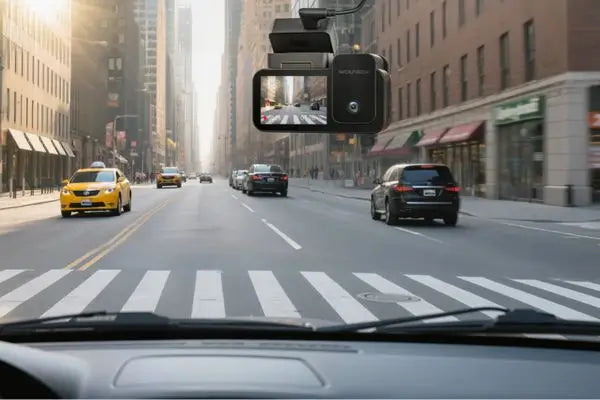
The G900Pro gives you a clear 4K recording for the front and 2.5K for the rear, both with wide-angle views. It also has GPS tracking to record location data and a great parking mode to keep your car safe.
The G900 TriPro comes in two versions to fit different driving needs.
The Cabin Version includes front, rear, and interior (cabin) cameras — ideal for full 360° coverage and monitoring both the road and your car's interior.
The Bumper Version features front, rear, and front bumper views, offering a wider external perspective that captures blind spots and close-up front details, perfect for Tesla owners who want complete on-road visibility.
The WOLFBOX G850Pro features dual-screen recording with a 4K front camera and 1080P rear camera, plus 5.8 GHz WiFi, built-in GPS, ADAS and BSD safety alerts, and voice control for a safer and smarter drive.
Premium Video Quality: With 4K recording, you can record videos that are sharp and clear. This makes it easy to see everything on the road.
Comprehensive Coverage: Your car is fully protected with triple-channel views that give you a complete look at all angles around you.
Reliable Technology: With GPS tracking and cloud storage, you can trust this dash cam to keep your recordings safe and accessible anytime.
Cost-Effective: At a price that fits your budget, you can get better features and good performance.
It is easier than you think to install a dash cam in your Tesla. Follow these steps for a smooth setup, whether you do it yourself or hire someone to do it.
1. Gather Your Tools
You'll need a dash cam, a power cable and some mounting tools like an adhesive or a suction mount.
2. Choose the Location
Place your dash cam behind your rearview mirror or in the middle of your windshield for the best coverage.
3. Mount the Dash Cam
Secure your dash cam to the desired location using adhesive tape or a suction mount.
4. Route the Cables
Carefully route the cables along the edges of your windshield and plug them into your Tesla's power outlet.
5. Test the Dash Cam
Start up the dash cam and check the camera angles to make sure everything is aligned properly.
A dash cam can make you feel much safer and more sure when you are driving or parking your Tesla. If you buy a third-party dash cam like a Wolfbox, it has features like 4K video quality and G-Sensors that are unmatched and take your car's security to a whole new level.
Don't wait until you need evidence of an incident. Browse Wolfbox dash cams today and experience the difference for yourself.
1. Does Tesla's built-in dash cam have parking mode?
Tesla does have a feature called "Sentry Mode", which can be used as a simple parking surveillance system. Dash cams, on the other hand, usually have more advanced features.
2. Can I install a third-party dash cam alongside Tesla's system?
Of course. For better protection and video backup, you can use both systems at the same time.
3. What resolution is best for a dash cam?
4K resolution is recommended for clear and detailed video recording that captures crucial details like license plates.
4. How much does a premium dash cam cost?
Prices vary, but Wolfbox dash cams offer premium features starting at competitive prices around $100 to $300.
5. Do dash cams work while the car is off?
Yes, many dash cams with parking mode can record even when your car is off for better security.